Solar plant monitoring and automation

Your solar plant. Under your control.

Monitoring, automation and energy management. Keep your battery in check, prepare for outages, and control charging and grid export by day-ahead market prices.

Locally on your mini PC or through a separate cloud. Alongside the official app or independently of it.

  • Local polling every 10 seconds
  • Mini PC: local operation without internet
  • Watchdog with Telegram notifications

DEYE today. Other equipment can be integrated on request.

Day-ahead market scenarios are for users with an active consumer contract and energy storage.

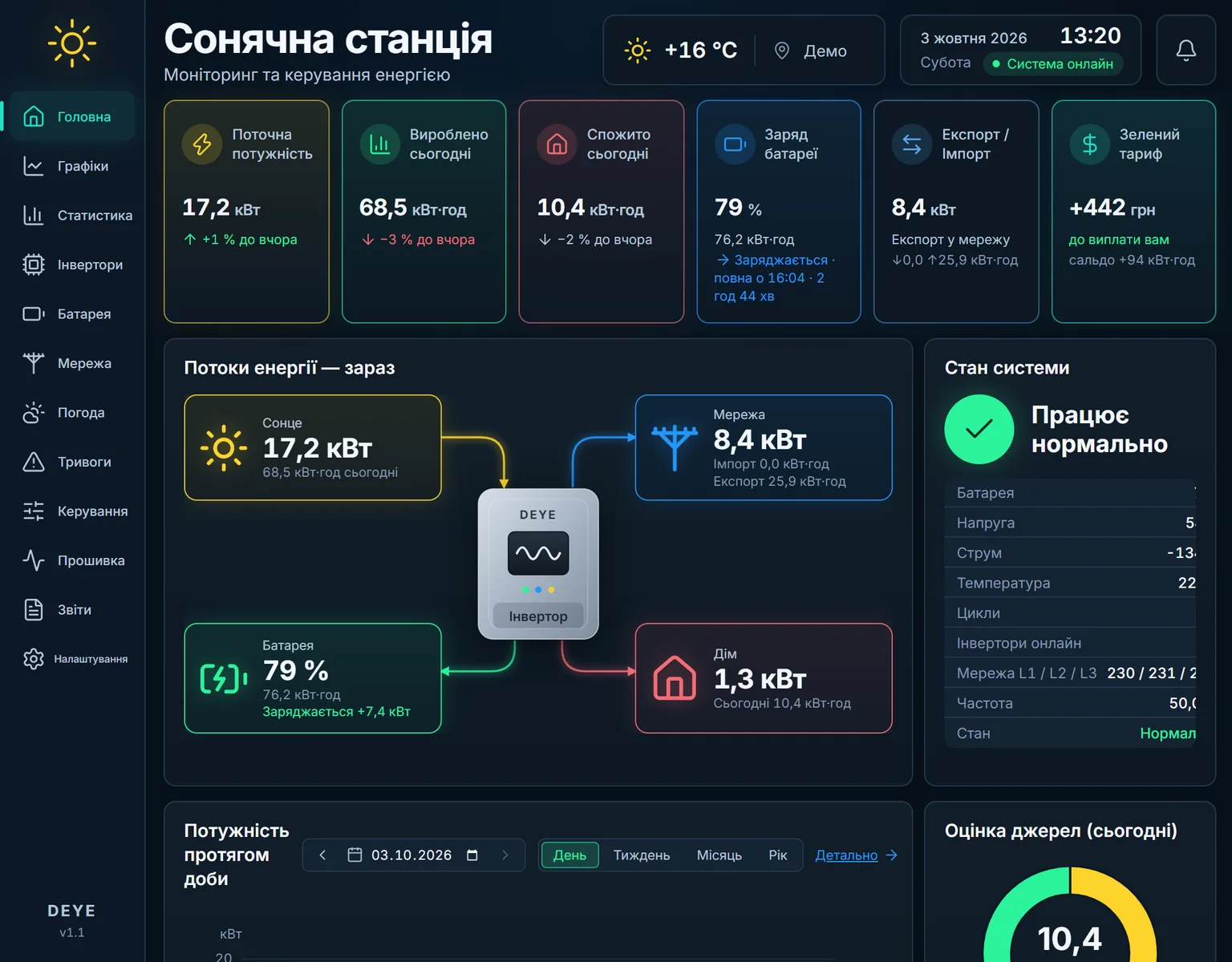
Example of the solar.cordteh.com interface: energy flows, battery state and a power chart.
Demo interface. Not your plant’s data.

Smart automation

Choose a goal. The station works towards it on its own.

You choose what matters most, and the automation adjusts the battery, charging and selling every day to match. It takes your home, the weather, outage schedules and prices into account.

Maximum independence

For those who want power at all times.

The home runs on sun and battery; the grid only steps in when your own energy runs out. Nothing is sold to the grid.

  • The battery keeps a reserve for outages
  • Energy is bought only when your own runs out
  • The station prepares itself before an outage
Independence + feed-in tariff

For those with a feed-in («green») tariff.

Solar goes to your home and battery first; the surplus is sold to the grid at the feed-in tariff. The battery is never sold — it is your reserve.

  • Your own consumption always comes first
  • Surplus sunshine turns into money
  • What you sold and earned is visible every day

Independence + day-ahead market

For those with an active-consumer contract.

Every day the system makes a plan: charge the battery when energy is cheap, sell when it is expensive. Your outage reserve is never sold.

  • A plan for every day at market prices
  • The outage reserve stays at home
  • Hourly settlement by the meter

What the automation takes into account

  • How much your home uses, and when
  • Sun and weather forecast for your station
  • Outage schedules for your area
  • Battery capacity, its limits and the outage reserve
  • Your tariff or the market price for every hour
  • The inverter and battery protections — we never switch them off

You decide how far to trust the automation

At first the system only advises. Then it acts with one tap from you. Once you are sure it does the right thing, you can hand it over completely. The goal can be changed at any time.

Independence and the feed-in tariff are part of the «Autopilot» package, the market is part of «RDN». The feed-in tariff and the market need the matching contracts. What is available depends on the equipment; the outage reserve is an estimate, not a guarantee.

Deployment

Where will your system run?

Choose how you want to work. We check compatibility and available features for your equipment.

Locally on a mini PC

Your system. Your data.

The app and its own database run on the plant’s network. Local monitoring and history do not depend on the internet, the manufacturer’s servers or the solar.cordteh.com servers.

  • App and database on a mini PC in the plant’s network
  • Local equipment polling every 10 seconds
  • Monitoring and history available without internet
  • No mandatory manufacturer cloud

Condition. The mini PC needs power and a local connection. New external data, Telegram and remote access require internet.

Through a separate cloud

Reach your plant over the internet.

The plant sends data to a separate cloud server, independent of the manufacturer’s official cloud. You can keep the official app or work without it.

  • A separate server, not the manufacturer’s cloud
  • Browser access to your plant over the internet
  • Keep the official app or work without it
  • Feature set and update rate are stated in the proposal

Condition. Requires internet. The provider, hosting country, connection method and storage terms are stated in the proposal.

The official app — your choice.

Keep both running side by side or use solar.cordteh.com independently of the official service. We verify the connection for your specific configuration.

Deployment options at a glance

Where the app and database run
Locally on a mini PCMini PC on the plant’s network
Through a separate cloudA separate cloud server
Internet
Locally on a mini PCFor Telegram, external data and remote access
Through a separate cloudRequired to operate
Access
Locally on a mini PCBrowser on the plant’s network; remotely through a protected sign-in
Through a separate cloudBrowser over the internet with a protected sign-in

Pricing is agreed once the equipment, deployment and integrations are clear.

Deviation control

No need to watch charts all day.

The Watchdog analyses the grid, strings, battery and the link to your equipment. It compares output with the typical behaviour of your own plant and notifies you about deviations. In the evening you get a daily summary.

What it tracks

  • Voltage and phases
  • BMS blocking
  • Charge mismatches
  • Temperatures
  • Data loggers
  • Settings changed outside the dashboard

Comparisons depend on history and available weather data. Telegram delivery requires internet.

See the interface
String output and its usual rangeDemo data
Demo chart: between 11:30 and 15:00 the string’s actual output is below its usual range for similar sunshine.
  • Usual range
  • Actual output
  • Deviation

Example notification

solar.cordteh.com · Watchdog

A string is producing less than its usual range for current conditions. Check its readings and the deviation history.

Example events

  1. String below its usual range
  2. Charging blocked by the BMS
  3. Setting changed outside the dashboard

Demo data

Schedule and forecast

Know the schedule. Understand your reserve.

The outage schedule for a supported group, your consumption profile, battery capacity and the solar forecast — in one scenario. The system estimates your energy reserve and helps you prepare the plant for the planned window.

Preparation on your command or through an automatic scenario you enable. For supported schedules you are notified when the schedule is published and 30 minutes before a planned outage.

The generation forecast is tuned on your plant’s history. The forecast horizon takes the estimated autonomy into account.

Example scenarioGroup 3.2 — exampleThursday, 15 October · Kyiv timeSchedule updated at 07:40
Automatic scenario is off
Demo timeline of a day: forecast battery charge level, a planned outage from 14:00 to 18:00, a notification at 13:30 and a 10% lower discharge limit.
  • Planned outage 14:00–18:00
  • Forecast battery charge
  • Notification at 13:30
  • Now 10:00
  • Lower limit 10%

Estimated reserve for the window

≈ 6 h

Charge at window start ≈ 72% · capacity 30 kWh · average consumption 2.9 kW · solar forecast until 14:00

Clicking changes only this example on the page and sends no commands to any equipment.

The reserve is an estimate, not a guarantee. Emergency outages, schedule changes, weather and consumption affect the result.

Corridor demoDemo data

Charge now64 %

Lower limit20 %

Upper limit90 %

ModeSummer

Values are for demonstration and are not a recommendation for your equipment. The demo works only on this page and sends nothing to any equipment.

Battery and modes

Your reserve. Your charge limits.

Set the lower discharge limit and the upper charge limit right on the battery bar. Switch between summer, winter, reserve and other quick scenarios without hunting for settings.

The buffer ceiling holds the set charge level and keeps spare capacity for the plant to work with variable generation.

Also in the app: immediate charging from the grid, exporting stored energy to the grid and charge current — depending on the equipment.

Scenarios depend on equipment and settings. Software control does not replace the built-in protections of the inverter and BMS.

For active consumers in Ukraine

Manage energy. With its price in mind.

solar.cordteh.com controls battery charging and grid export by the published prices of the Ukrainian day-ahead market. Your electricity supplier handles the settlements.

Requires an appropriate active consumer contract, energy storage and compatible equipment. Specific scenarios depend on the connection and contract terms.

The day-ahead price is not automatically your net selling price. Financial results are not guaranteed.

Day-ahead prices for one day — exampleDemo data
Demo chart of hourly day-ahead market prices: average at night, low during the day and high in the evening. Below the chart is the plant plan: charging during the day and exporting to the grid in the evening.
  • Charge
  • Hold
  • Export to grid

Plant plan — example. A planned time does not mean that charging or export has already happened.

Demo scenario. Not a trading signal or an income forecast.

Trade order submission — an optional add-on

On request, the package can be extended with an integration that submits trade orders to your supplier or aggregator. The exchange format and available operations are agreed before connection.

Discuss order submission

What the app does

From every string to the whole plant.

Readings, history and control in one interface. The list of parameters depends on the model, firmware and configuration.

Live readings and BMS

Data for the plant and every inverter: solar per string, home, grid per phase, battery and available BMS readings.

Your own history and export

Day, week, month and year, export to a spreadsheet and your own database without a forced 90‑day limit on local history.

Settings in one place

Modes, time slots, charge and discharge currents, grid export, time sync and available service parameters according to permissions.

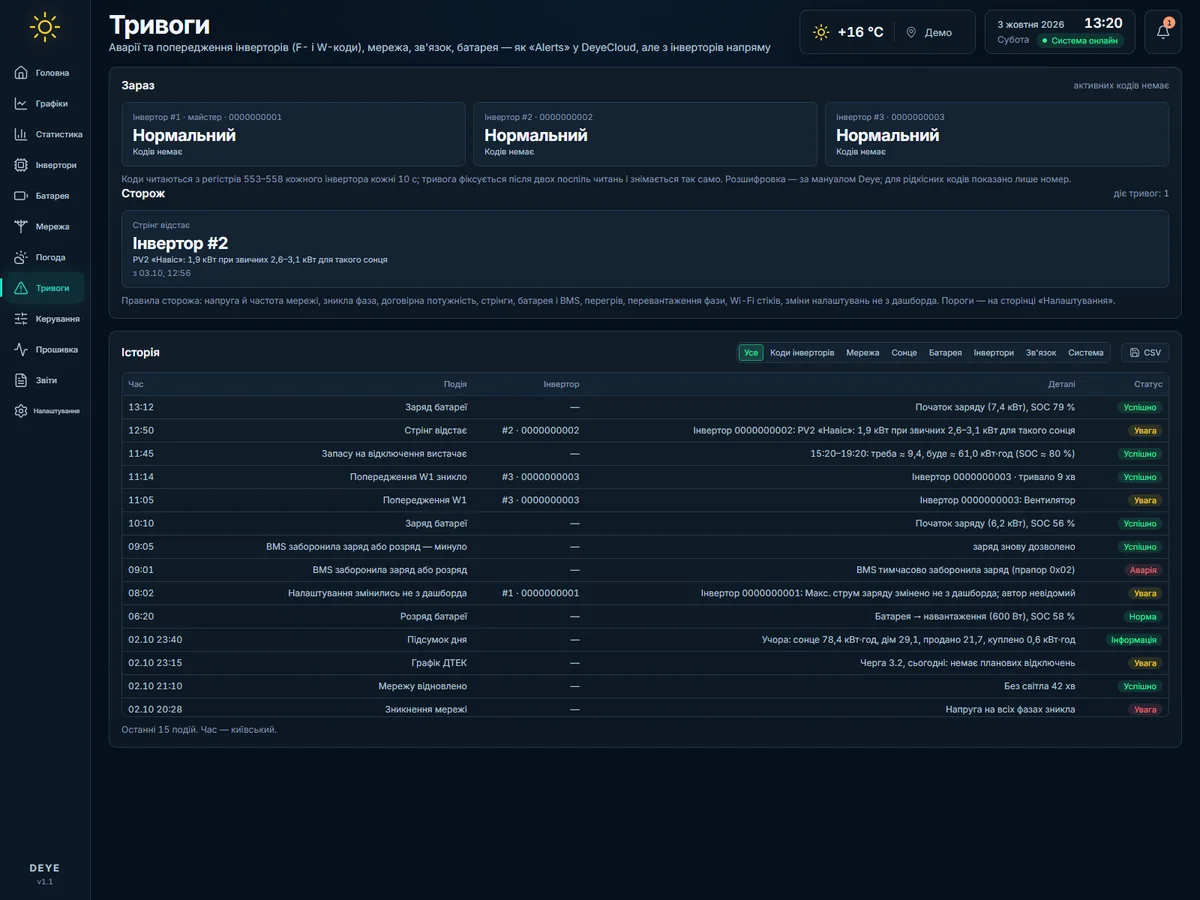
Alarms with explanations

Inverter error and warning codes, system state and a log of important events.

Financial picture

Feed-in tariff calculation with the National Bank of Ukraine exchange rate and configured taxes, net balance, month forecast and report. A calculation is not a received payment.

Phone, guests and log

Add it to your phone’s home screen, share temporary revocable view links and a QR code, and keep a log of changes.

History depth and detail depend on storage. Migrating existing data is agreed separately.

Pricing

Free: what the manufacturer gives. Subscription: what it does not.

The cloud and standard control are free for every connected station. Everything else comes in packages for a monthly fee per station. Prices are stated without a payment method: terms are agreed after your request.

Cloud

free

The same as the manufacturer gives, through our cloud or locally.

  • live readings, history, charts, statistics
  • alarms in the app
  • standard control — every settings section, as in DeyeCloud
  • phone, dark theme, one or several stations

Watcher

$3 / month per station

The station tells you when something is off.

Everything in “Cloud” plus:

  • Telegram and deviation rules: strings, BMS, temperatures, loggers, settings changed outside the dashboard
  • island detector with causes
  • the DSO outage schedule and advice before an outage
  • daily digest, guest links with QR, CSV, logger firmware

Autopilot

$6 / month per station

The dashboard prepares the station for outages and does the money.

Everything in “Watcher” plus:

  • outage preparation with one tap or automatically
  • charge ceiling, battery corridor, quick modes, over-voltage guard
  • solar forecast calibrated on the station, and weather
  • money: feed-in tariff with the NBU rate and taxes, balance, report
  • station mode: autonomy with or without selling

Day-ahead

$9 / month per station

Trading on the day-ahead market by a daily plan.

Everything in “Autopilot” plus:

  • market prices every day, a daily plan by prices, reserve and the outage schedule
  • the trust ladder: advice → one tap → automatic
  • hourly settlement by the meter at day-ahead prices
  • everything in “Autopilot”

A lower package never erases settings — features are only switched off. Terms for a second and further stations of the same owner are agreed separately.

You decide who sees your plant.

Remote access is for authorised users. Guests can get a view-only link with an expiry date; you can revoke access and share a QR code.

Changes made through the app are logged with the user and time. Changes made outside the app are marked separately: their author may be unknown.

  • View-only guest access
  • Link expiry and revocation
  • QR code to show on a phone
  • Change log with user and time
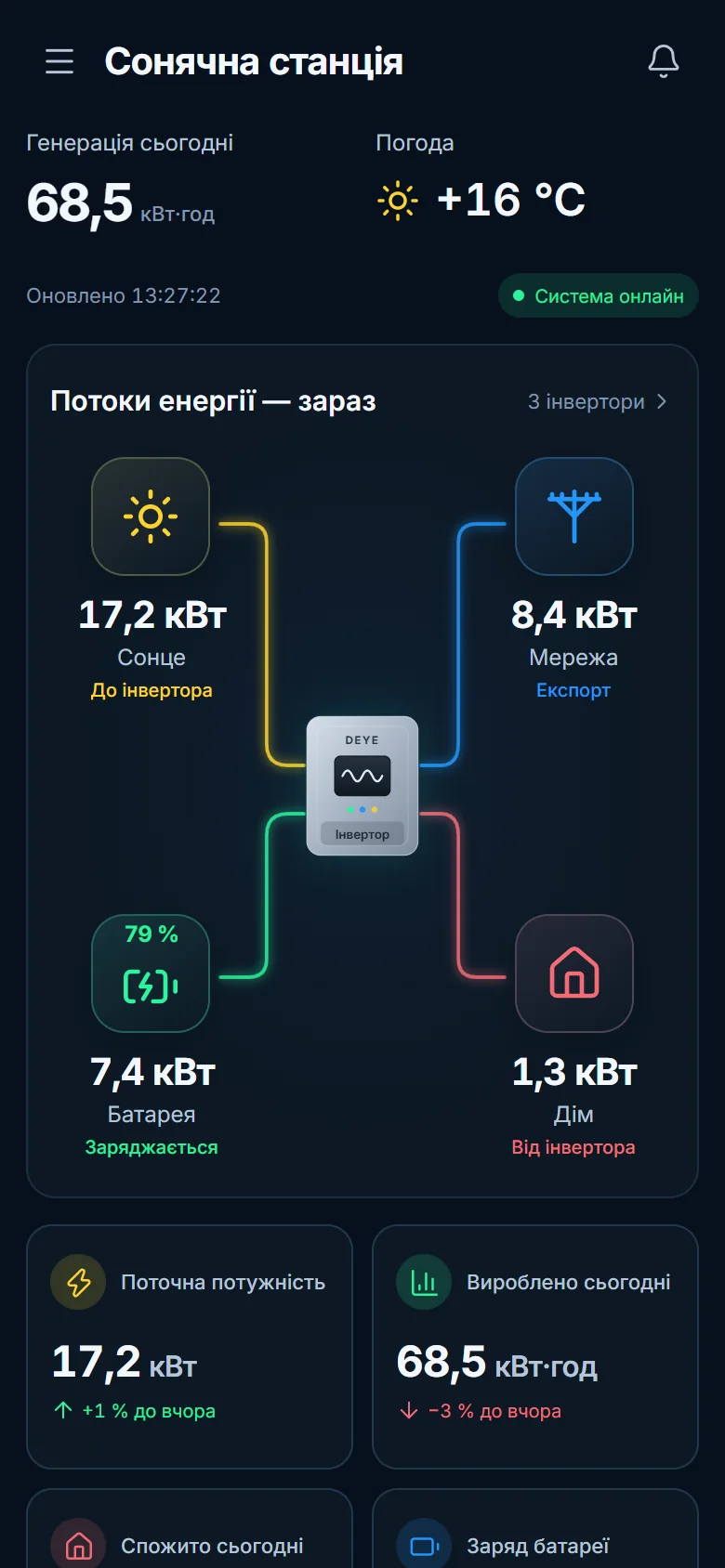
Demo guest view on a phone: battery charge, solar and home power.
Guest view on demo data.

DEYE today. Your equipment on request.

The system currently works with DEYE equipment. Before connecting, we check the model, firmware, data logger and available features. For other equipment we can develop an integration after a technical assessment.

solar.cordteh.com is an independent product. Manufacturer names indicate compatibility, not an official partnership.

What we check before connecting

  • Model
  • Firmware
  • Data logger
  • Available features
Check compatibility

From your equipment to a configured interface.

  1. Describe your plant

    Tell us about the equipment, how you want to work and the features you need.

  2. We agree the configuration

    We check compatibility, the set of components and connection terms.

  3. We show it working

    We demonstrate the agreed scenarios and how to use them.

Before you connect

What works without internet?

In the local option, the mini PC receives data and stores history on your network. It needs power and a local connection. Telegram, new forecasts, schedules, exchange rates, day-ahead prices and remote access require internet.

What does “every 10 seconds” mean?

It is the local polling interval for your equipment. The update rate of individual parameters, history recording and data delivery to the cloud may differ.

Do I have to give up the official app?

No. You can keep both running side by side or use solar.cordteh.com independently of the official cloud. The connection method is verified for your equipment.

Where is the cloud located?

A separate server is used, not the manufacturer’s official cloud. The hosting country, provider and data access terms are stated in the proposal.

Can old data be migrated?

We check this based on the data source you have. In our own installation the cloud history has already been migrated; this does not guarantee import of any format or period.

Is the battery guaranteed to last through an outage?

The system estimates the reserve from consumption history, capacity and the forecast. The actual duration depends on load, weather and outage conditions.

How does the day-ahead module work?

It controls charging and grid export by published prices. Your supplier handles the settlements. It requires an appropriate contract, energy storage and a compatible configuration.

Is trade order submission included?

It is a separate package option. Whether integration is possible, the exchange format and the available operations are agreed with your supplier or aggregator.

Can I use it on my phone?

Yes. On a supported phone you can add the web interface to the home screen. No separate native apps in app stores are claimed here.

Can I give access to someone else?

Yes. There is a guest view by link with an expiry date, revocation and a QR code. Guest view does not allow controlling the plant.

How much does a connection cost?

Pricing is agreed once the equipment, deployment option and required integrations are clear. Send a request to receive a proposal.

Let’s connect your plant to clear, simple control.

Tell us about your equipment and the features you need. We will check compatibility and prepare a configuration for your task.

What are you interested in? (required)

How we should address you.

We will reply to this address.

Any format, including international.

How you want to work (required)

For example, DEYE or another manufacturer.

As shown on the label or in the inverter menu.

Which package are you interested in? (required)

Terms and the start of service are agreed after your request.

Do you have an active consumer contract? (required)

Answering “No” does not prevent a consultation.

Total storage capacity, if known.

Up to 2000 characters. No passwords or access codes.

Request data is used only to answer the request.

Do not send passwords, tokens or access codes for your plant.